



Author: Logan Hardy
Editor: Taylor Latendre
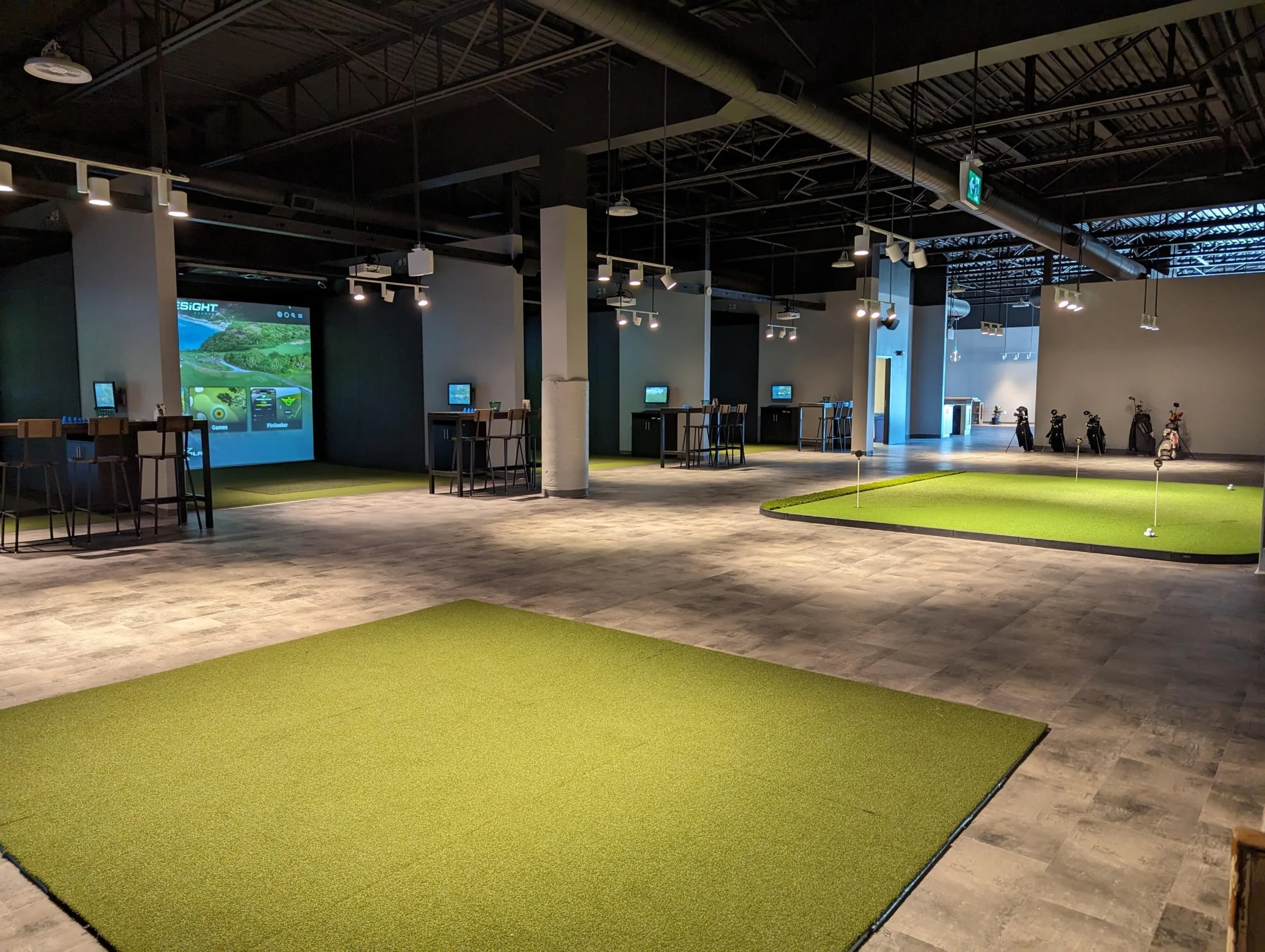
Indoor golf has evolved from a winter alternative into a thriving year-round business opportunity. Across Canada, golfers are now looking for new ways to practice, play, compete, and socialize regardless of the weather, creating growing demand for high-quality indoor golf facilities.
Whether you’re planning a dedicated simulator venue, adding golf to an existing business, or expanding your coaching or club fitting services, opening an indoor golf facility requires careful planning. From selecting the right location to choosing launch monitor technology and creating a memorable customer experience, every decision plays a role in your long-term success.
This guide walks through some of the key considerations to help you plan and build an indoor golf facility that meets your business goals and delivers an exceptional experience for your customers.
Define Your Business Model
Before choosing equipment or signing a lease, determine what type of facility you want to build.
Common business models include:
Public Simulator Venue
The most common model, customers book simulator bays by the hour for casual play, practice, and leagues.
Private Membership Club
Members receive priority access, discounted bookings, and exclusive events. This could also be intertwined with the previous public simulator venue to open up more revenue streams.
Golf Instruction Studio
Designed around lessons, player development, and performance analysis.
Club Fitting & Retail Centre
A fitting-focused business using launch monitor data to recommend equipment.
Multi-Use Entertainment Venue
Combines simulator golf with food and beverage service, corporate events, leagues, and social gatherings.
Many successful facilities blend several of these models to create multiple revenue streams.
Understand Your Market
Every community is different.
Before investing, research:
- Local golf participation
- Number of nearby golf courses
- Existing simulator facilities
- Population growth
- Winter climate
- Corporate market opportunities
- Demand for junior programs and coaching
Understanding your local market helps identify opportunities to differentiate your business. An area with high population growth, a growing demand for junior coaching, and a small number of nearby courses would be a prime environment to launch a mixed-use facility that provides hourly bookings alongside coaching and lessons.
Choosing the Right Location
Your location should balance visibility, accessibility, and operating costs.
Consider:
- Parking availability
- Easy access from major roads
- Ceiling height
- Building width
- Power requirements
- HVAC capacity
- Future expansion potential
Industrial units often provide excellent flexibility, while retail locations may offer stronger visibility and foot traffic.
How Much Space Do You Need?
One of the first questions prospective facility owners ask is how much room is required for golf simulators.
While requirements vary depending on your equipment and layout, most commercial simulator bays benefit from generous dimensions that allow golfers to swing comfortably and accommodate both right- and left-handed players.
When planning your space, consider:
- Ceiling height – recommended 11′
- Bay width – 15′
- Bay depth – 18′ minimum and up to 25′ deep for seating arrangements
- Walkways
- Reception area
- Waiting/lounge space
- Storage
- Staff workspace
- Club fitting area (if applicable)
Leaving room for future expansion can save significant renovation costs down the road.
Choosing the Right Launch Monitor
The launch monitor is the heart of every simulator bay. Choosing the right technology will influence the overall player experience, the services you can offer, and the long-term success of your facility.
Foresight Sports offers several launch monitor solutions, each designed to meet different business needs.
Falcon
The Falcon is Foresight Sports’ flagship overhead-mounted launch monitor, designed specifically for commercial simulator environments. Installed above the hitting area, it creates a clean, unobstructed playing space while delivering the same trusted photometric accuracy Foresight Sports is known for.
Its fixed overhead design eliminates the need to reposition the launch monitor between players, making it an ideal solution for facilities with multiple simulator bays, high customer traffic, or both right- and left-handed golfers. The Falcon combines convenience, reliability, and premium performance, helping operators maximize bay efficiency without compromising on accuracy.
Best suited for:
- Multi-bay commercial facilities
- Entertainment venues
- Indoor golf centres
- Golf simulator franchises
- Facilities accommodating both right- and left-handed golfers
QuadMAX
The QuadMAX builds on the legendary performance of the GCQuad while introducing new features that make it even more versatile for coaching, club fitting, and commercial facilities. Using Foresight Sports’ proven Quadrascopic camera system, it delivers the same industry-leading ball and club data trusted by PGA professionals, fitters, and instructors worldwide, while adding onboard touchscreen controls, simplified alignment, customizable data displays, and improved battery life.
Its portable design allows businesses to move seamlessly between simulator bays, driving ranges, and outdoor fitting environments without sacrificing accuracy. For facilities that want the most advanced portable launch monitor available, the QuadMAX delivers exceptional performance for both indoor and outdoor use.
Best suited for:
- Premium teaching academies
- Professional club fitting studios
- High-performance training centres
- Indoor and outdoor coaching
- Businesses requiring maximum portability and versatility
GCQuad
The GCQuad is the industry’s benchmark for advanced performance analysis. Its Quadrascopic camera system provides expanded club and impact data relative to other portable options, making it the preferred choice for teaching professionals, club fitters, and high-performance training environments.
For facilities offering premium instruction or custom club fitting, the GCQuad delivers the detailed insights needed to help golfers improve and make informed equipment decisions.
Best suited for:
- Teaching academies
- Club fitting studios
- Performance centres
- Elite player development
GC3
The GC3 delivers tour-level accuracy at a lower cost in a portable, camera-based design, making it an excellent choice for facilities focused on simulator rentals, lessons, and player development. It’s ideal for businesses looking to offer a premium golf experience while maintaining flexibility between indoor and outdoor use and not having to break the bank.
Best suited for:
- Public simulator bays
- Golf instruction
- Practice facilities
- Multi-purpose golf businesses
Which Launch Monitor Is Right for Your Facility?
The best solution depends on your business model and the experience you want to deliver.
- Choose the GC3 if you need a budget friendly, portable launch monitor for lessons, simulator rentals, and player development.
- Choose the GCQuad if your facility specializes in professional instruction, club fitting, or advanced player analysis.
- Choose the QuadMAX if you want Foresight Sports’ most advanced portable launch monitor, combining elite performance with enhanced usability, portability, and flexibility for both indoor and outdoor operations.
- Choose the Falcon if you’re designing a dedicated commercial simulator facility and want a permanent overhead solution that maximizes convenience, bay efficiency, and customer experience.
Many successful facilities incorporate more than one launch monitor. For example, entertainment bays may feature Falcons for seamless gameplay, while a dedicated teaching or fitting studio is equipped with a GCQuad to provide advanced club and impact analysis, or to use on the green for putting analysis. This combination allows businesses to cater to a wide range of golfers while maximizing the value of each simulator space.
Choosing Simulator Software
Your software shapes the customer experience.
Look for platforms that offer:
- Realistic graphics
- Extensive course libraries
- Practice modes
- Skills challenges
- League support
- Tournament tools
The right software should appeal to both experienced golfers and first-time visitors.
Foresight’s FSX software suite provides all of this and more. FSX Play comes with 25 free courses and you can add on over 250 more over time. It also has fantastic practice range features, with a dedicated data analysis tab that allows you to see many key club data points including a diagram of the point of impact on the face, face angle, and dynamic loft/lie for those really looking to hone their game.
Foresight’s portfolio also includes softwares like Foresight Fairgrounds, which is excellent for younger children who want to play arcade-style games while still improving their golf abilities.
Designing an Exceptional Customer Experience
People return because of the overall experience, not just the technology.
Successful facilities focus on:
- Comfortable seating
- Clean layouts
- Quality lighting
- Fast booking process
- Friendly staff
- Food and beverage options
A welcoming environment encourages repeat visits and positive word of mouth.
Diversify Your Revenue Streams
Hourly simulator rentals are only one source of revenue.
Many successful facilities also offer:
- Memberships
- Golf lessons
- Club fitting
- Junior programs
- Winter practice packages
- Corporate events
- Birthday parties
- League play
- Tournaments
- Food and beverage service
There is no problem with starting out with an hourly rental model, but diversifying over time to include memberships and lessons will allow you to create consistent, recurring revenue streams.
Build a Marketing Strategy Before You Open
Marketing should begin well before opening day.
Consider:
- Social media campaigns
- Email newsletters
- Grand opening events
- Local golf club partnerships
- Corporate outreach
- Influencer visits
- Referral programs
- Google Business Profile optimization
Building excitement early can help generate bookings from day one.
Plan for Long-Term Growth
Think beyond your first year.
As your business grows, you may want to add:
- Additional simulator bays
- Club repair services
- Expanded coaching programs
- Club fitting studios
- Retail space
- Hospitality offerings
- Corporate memberships
- Franchise opportunities
- Simulator Add-ons: (HYZR, GSPro, etc.)
Planning for growth during the design phase can make future expansion much easier.
As you progress, you may be looking for additional offerings to attract more customers. Foresight offers many add ons ranging from software like GSPRO that gives you access to thousands of courses, to HYZR which is a disc golf simulator that fits right into your existing Foresight bay, giving you access to a whole new market.
Why Your Technology Partner Matters
Opening an indoor golf facility is about more than purchasing equipment, it’s about creating a business that customers trust and return to.
Working with an experienced technology partner ensures your facility is designed around proven solutions that support long-term success. From launch monitor selection and simulator design to installation and ongoing support, having expert guidance can help you avoid costly mistakes and create a premium customer experience from day one.
Ready to Start Your Indoor Golf Facility?
Whether you’re opening your first simulator venue, expanding your coaching business, or adding golf to an existing entertainment concept, thoughtful planning is the foundation of long-term success.
The team at Foresight Sports Canada has helped facilities across the country bring their vision to life. If you’re ready to explore your options, contact us to discuss your goals, your space, and the technology that’s right for your business.
FAQ
1. How much space do I need to open an indoor golf facility?
Most commercial golf simulator bays require approximately 11 feet of ceiling height, 15 feet of width, and 18-25 feet of depth to comfortably accommodate golfers and simulator equipment. Beyond the simulator bays, you’ll also want to plan for reception areas, walkways, lounge space, storage, and any dedicated coaching or club fitting areas.
2. What is the best launch monitor for a commercial golf simulator?
The best launch monitor depends on your business goals. The Foresight Falcon is ideal for permanent commercial simulator bays thanks to its overhead design and ability to accommodate both right- and left-handed golfers. The QuadMAX and GCQuad are excellent choices for teaching, club fitting, and player development, while the GC3 offers professional-grade accuracy at a more accessible price point for simulator rentals and lessons.
3. How can an indoor golf facility generate revenue?
Successful indoor golf businesses often generate income from multiple sources, including hourly simulator rentals, memberships, golf lessons, club fitting, junior programs, leagues, tournaments, corporate events, birthday parties, and food and beverage sales. Diversifying your offerings can help create steady, year-round revenue and improve customer retention.
4. What should I consider before opening an indoor golf business in Canada?
Before opening an indoor golf facility, evaluate your local market, choose a suitable location, determine your business model, and select the right simulator technology. It’s also important to develop a marketing strategy before launch and design your facility with future growth in mind. Careful planning from the outset can help you avoid costly mistakes and build a business that delivers long-term success.


